Next.js Hosting for WordPress Agencies: Why Our Customers Asked Us to Build Velumi

For ten years, Templ has done one thing: managed WordPress hosting for European web agencies. It’s a focused business and we like it that way. Agencies trust us with their clients’ most important sites, and we keep those sites fast, secure, and online.

So the conversation that started showing up late last year caught my attention. It wasn’t about WordPress at all.

Agency after agency was asking the same thing: “Can you host our Next.js sites too?”

These were our own customers — people who already run their WordPress projects with us. Their dev teams had started building marketing sites, client dashboards, and storefronts in Next.js. They were deploying those on a usage-based platform, it worked technically, and the developer experience was good. But three problems kept coming up. The same problems, over and over, and all three were forcing agencies into uncomfortable conversations with their own clients.

The bill that started it

One call stuck with me. A Stockholm agency we’ve worked with for years called, frustrated. They’d put a client’s e-commerce frontend on a usage-based PaaS, and the monthly bill had jumped from €95 to €780 — in a single month.

“I quoted my client €150 a month for hosting,” he said. “How do I explain a €780 invoice?”

It wasn’t one runaway charge. It was build time, backend calls, caching, edge requests — each line item looked reasonable on its own. Added together, the total was impossible to predict at the moment they were quoting a fixed monthly retainer.

If you run an agency, you know exactly why this is a problem. Hosting gets bundled into a monthly retainer. That only works when the underlying cost is predictable. When it isn’t, it’s not an annoyance — it’s a margin risk you carry every month.

This wasn’t a one-off. Developers have been saying the same thing publicly:

I’m CTO of a small startup… Last month the bill jumped from under $100 to over $800. This is for an application that is just hosting the front-end.

— u/BaumerPT, r/nextjs, Jan 2026 source
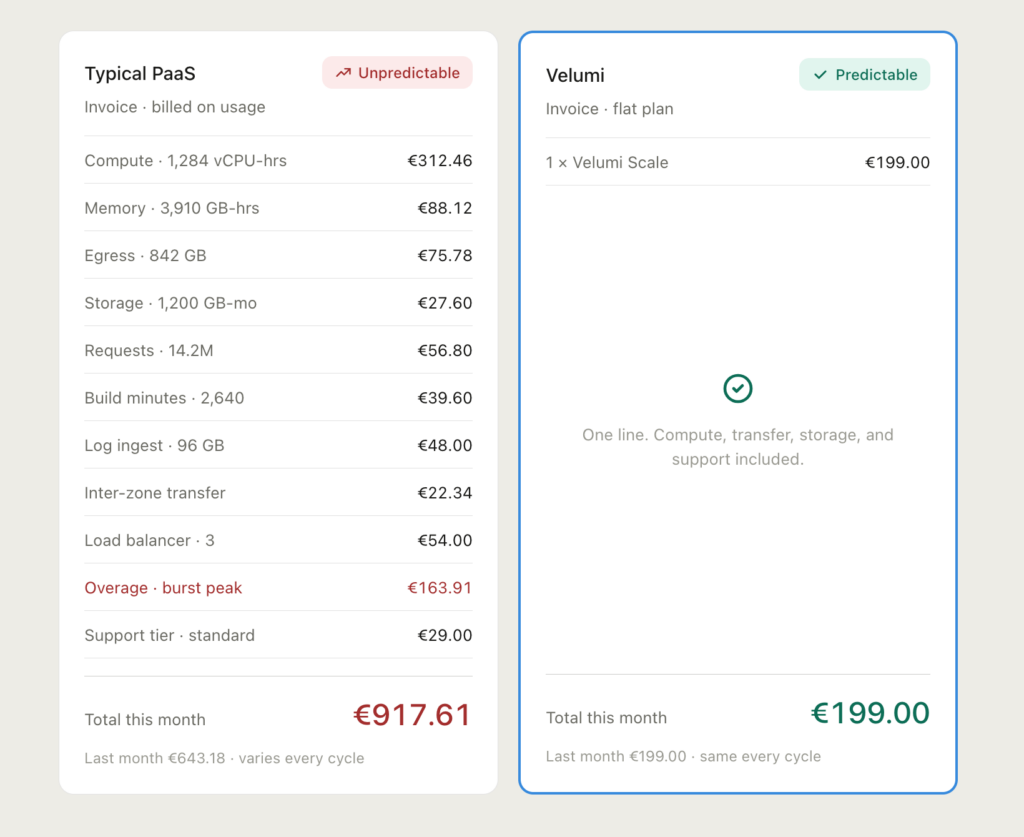
The platforms have added spend tools since — alerts, caps, auto-pause. But they’re opt-in, not defaults, and they don’t fix the root cause: complexity. When you’re tracking nine separate meters for builds, requests, caching, and bandwidth, just predicting the bill becomes a job.

“But where is the data actually stored?”

The second problem is one we know intimately at Templ, because it’s the reason a lot of agencies host their WordPress with us in the first place.

Every agency we talked to was hearing the same question from clients: “Where is our data hosted?”

Five years ago that was a niche compliance footnote. Today it’s in every RFP, every procurement checklist, every contract negotiation — especially in Europe.

Here’s the honest version: GDPR does not always require EU hosting. But EU hosting is often the simplest answer in a client conversation. US providers can be subject to US jurisdictional access requests even when the data physically sits in Europe. For some clients — finance, healthcare, public sector — that legal exposure alone is enough to fail procurement, regardless of the technical setup. (source)

And the legal ground keeps shifting. The EU–US Data Privacy Framework survived its first challenge in September 2025, but it’s under appeal, and previous frameworks were struck down by European courts. (source)

The market has clearly picked a direction. Traffic to european-alternatives.eu surged 1,100% in 2025. Worldwide sovereign cloud investment is projected to hit $80 billion in 2026, with the European sovereign cloud alone accounting for $12.6 billion. Even AWS is building a European Sovereign Cloud with a €7.8 billion commitment. (source)

So our customers had a strange split. Their WordPress sites sat safely on European infrastructure with us — and a clear answer for procurement. Their Next.js sites sat somewhere they couldn’t get a clean “EU only” answer for. When that question turned into a cross-border legal review, the sales cycle slowed to a crawl, and the agency ended up doing compliance work they never priced into the project.

The €200 a month before hosting anything

The third problem is specific to agencies, and it’s the one that frustrates them most.

Per-seat pricing.

On a typical Pro tier, a 10-person agency pays around $200/month in seat fees alone — $20 per seat — before deploying a single project or serving a single request. That’s roughly $2,400 a year just for dashboard access. (source)

For a venture-funded startup, $200/month is a rounding error. For a 10-person agency in Prague or Porto, it’s real money — the difference between a profitable small project and a break-even one.

It gets worse the more client sites you manage. Run 15 client projects and you’re paying:

  • ~$200/month in seat fees (your team)
  • plus bandwidth across 15 sites
  • plus function invocations across 15 sites
  • plus build minutes across 15 sites
  • plus edge requests, cache regeneration, and a handful of other meters

For a lot of agencies, the seat fees end up larger than the actual hosting. That model makes sense if you’re selling to enterprises with dedicated DevOps teams. It doesn’t make sense for a European agency where everyone wears several hats and the whole team needs access.

So we built Velumi

We had a choice. We could bolt some Next.js support onto our WordPress platform and call it a day. Or we could build the thing our customers were actually describing.

We built the thing. It’s a separate product called Velumi — managed hosting for Next.js and static sites, from the same team behind Templ, on European infrastructure.

We weren’t trying to build a cheaper version of what already exists. Cheap isn’t the point. Predictable is. Here’s the shape of it:

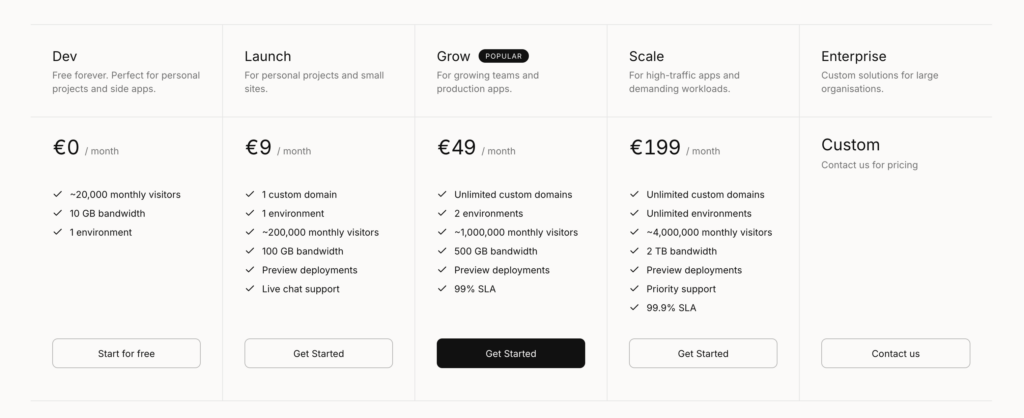
  • One price per project. Plans start at €9/month. Your baseline is plan price × number of projects. No per-seat fees layered on top.
  • Bandwidth is the only usage metric. No charges for function invocations, edge requests, build minutes, or cache regeneration. One number, shown clearly.
  • No seat fees. Add your whole team, client collaborators, freelance devs — the price doesn’t change.
  • EU data residency by default. Workloads run in European data centres. (As always, strict “EU only” depends on your full data flow, including any third-party services you connect.)
  • DPA available. A Data Processing Agreement you can hand to clients during procurement.
  • A spend cap on every plan. You set a monthly overage ceiling per project. Hit it and the site throttles instead of quietly running up a bill.

It launched with Next.js support because that’s exactly what our agencies asked for. Static sites work too, and more frameworks are on the way.
To be clear about how this fits together: WordPress stays on Templ. Velumi is for the modern frontend stack your dev team is building alongside it. Same people, same European infrastructure philosophy, two products for two jobs.

Who this is really for

We built Velumi with three groups in mind — and the first one is the agencies we already work with every day.

Agencies. You manage 10+ client projects. You need to quote hosting in proposals and not get burned by a surprise bill. You need EU data residency because clients demand it. You want your whole team to have access without paying $20 a seat. The math has to work on the small projects, not just the enterprise contracts.

Freelancers. You want to deploy in ten minutes and know exactly what the bill will be at month’s end. Every month. And EU compliance isn’t optional when your clients are European SMEs who take GDPR seriously.

Vibecoders. You built something real with Lovable, Bolt, or v0, and now you need a custom domain, HTTPS, and hosting that doesn’t look like a prototype. Connect a GitHub repo and you’re live — no Docker, no nginx configs, just push or drag-and-drop to deploy.

What we’re not trying to be

Let me be honest about the boundaries.

We’re not trying to replace every usage-based platform for every use case. If you’re a US enterprise running a globally distributed consumer app at massive scale, the incumbents have built genuinely impressive technology and may well be the right call. We have a lot of respect for that work.

We’re also not a bare-metal VPS where you wire up everything yourself. Hetzner and OVH are great if that’s what you want — but it’s not what our customers were asking for.

And we’re not racing to have the longest feature list on day one. What we have is reliable hosting, predictable pricing, and data that stays in Europe — for the agency that needs to put a hosting number in a proposal and trust it, and for the developer who wants to deploy and stop thinking about it.

If this sounds familiar

If you’re a Templ customer who’s been deploying Next.js somewhere else and quietly dreading the invoice — this is the part where I tell you we built the alternative you kept asking for.

Velumi is in early access now. The platform is stable, the pricing is exactly what I described above, and you can deploy today.

Try Velumi — sign up for early access →

Want to talk through whether it fits before you move anything? Reach out and we’ll help.

We built Velumi because our customers asked us to. Now we’d like to hear from you.

Sources

  1. Reddit r/nextjs, pricing discussion thread (Jan 2026). https://www.reddit.com/r/nextjs/comments/1qnld0e/is_anyone_else_frustrated_with_vercel_pricing/
  2. Vercel Community — “Outrageous billing on a monorepo” (Feb 2026). https://community.vercel.com/t/outrageous-billing-on-a-monorepo/34129
  3. Doug Belshaw — “Digital colonialism: jurisdiction matters more than geography” (Jan 2026). https://blog.dougbelshaw.com/digital-colonialism-resistance/
  4. Secure Privacy — “Data Residency Requirements: EU vs US Explained” (Apr 2026). https://secureprivacy.ai/blog/data-residency-requirements-eu-vs-us-explained
  5. Wire — “Guide to European Alternatives for Enterprises” (Nov 2025). https://wire.com/en/blog/european-alternatives-enterprise-guide
  6. Schematic, platform pricing analysis (Mar 2026). https://schematichq.com/blog/vercel-pricing

How to remove users from WP-JSON

Not everyone knows this, but by default WordPress exposes usernames and makes them available for the public to see over WP’s REST API.

A list all of all is available at users https://example.com/wp-json/wp/v2/users and one can also get information about a specific user at https://example.com/wp-json/wp/v2/users/1, where 1 is a user’s ID.

To disable these two endpoints, add this code snippet to your theme’s functions.php file:

// Disable /users rest routes
add_filter('rest_endpoints', function( $endpoints ) {
    if ( isset( $endpoints['/wp/v2/users'] ) ) {
        unset( $endpoints['/wp/v2/users'] );
    }
    if ( isset( $endpoints['/wp/v2/users/(?P<id>[\d]+)'] ) ) {
        unset( $endpoints['/wp/v2/users/(?P<id>[\d]+)'] );
    }
    return $endpoints;
});

Sustainable hosting – A closer look at the Hamina Google data center

The Hamina Data Center

Google purchased the site in Hamina from the Finnish paper company Stora Enso in 2009 and built the data center at the paper company’s old paper mill. It’s a great irony of our time that the mill, which closed down due to poor profitability caused by a drop in paper production, is now replaced by a data center.

Innovative cooling system

The data center is powered by Finland’s standard grid and has a power agreement (PPA) with a Swedish wind farm to account for its energy consumption. However, what makes the Hamina center stand out, is its innovative cooling system.

Cooling is an important factor for operational reliability in data centers, and over 20 percent of energy consumption is usually attributed to cooling. Google normally uses outside air for cooling, and Hamina has a beneficial climate with an average temperature of 2 degrees celsius. In the Hamina data center, Google also uses an advanced cooling system involving seawater.

The data center is located at the edge of the Baltic Sea. Water is pumped from the sea and transported inside underground granite tunnels, originally built and used by the paper mill, to the data center’s cooling system. The cold water from the sea removes the heat that is generated by the computers and flows from the facility back toward the sea. By the time it reaches the sea, the water temperature has dropped close to the original temperature of the sea.

The reuse of the old paper mill’s infrastructure is part of making the data center as green as possible and an excellent example of how Google is thinking “outside the box”.

Power usage effectiveness (PUE)

The most common metric for a data center’s energy efficiency is power usage effectiveness (PUE) – it’s the ratio of total energy used by a data center, to the energy delivered to the computing equipment. 

The average PUE in the world is 1.57, which means a 57% overhead (non-computing energy like cooling and power conversion). The average PUE for all Google’s data centers is 1.10, and the Hamina center’s PUE is 1.09. 

Low CO2 region

To empower customers to make more sustainable decisions, Google has introduced a Low CO2 label indicating which Google Cloud regions have the lowest carbon impact. These regions have a Google CFE%, representing the average percentage of time an application will run on carbon-free energy, of at least 75%. The Finland region can boast a CFE% of 94%, which is the highest of all Google regions. 

The Hamina data center is one of the most efficient ones in Google’s fleet, and may also be the greenest, and is an excellent example of how to build a data center with minimal impact on the local environment.

Google Cloud is now available in Poland – Use with WordPress

The establishing of a Google Cloud Data center in Poland is lead by a local company called DCP, they also partner with a polish bank. Together with Google they will work towards making the Google Cloud Platform a success in Poland. The data center being put to use now is located in Warsaw.

For the huge amount of people relying on having a fast WordPress website to serve people located in Poland, this is amazing news indeed. If you want your website to be amazing and always have a helping hand at your side, Templ is a perfect choice for you.

If you are planning on launching an e-commerce website targeting polish customers, for example, imagine having the fastest website available among your competitors, wouldn’t that be great? That is very much possible using the Google Cloud Platform when hosting your website.

If you would like to try our service for yourself, you can register for a trial account right now and get our help in migrating your site, if you already have one, or do it yourself if you prefer. After that you will be ready to go, and for 10 days you can experience all of what Templ has to offer you and your objectives.

The value of your website being fast when it comes to a pleasant experience for your visitors is apparent, but it has also become even more important than before, how you may ask? Recently Google officially made page speeds an important factor in how they rank websites. Since having a high ranking on Google can make such a huge difference for businesses, loading speeds has increased in importance. Therefore we recommend choosing your hosting wisely and only settle for a premium solution like Templ.

In summary, a Google Cloud data center has opened in Warsaw and you can now choose the region of Poland when using Google Cloud products. Since we here at Templ are providers of managed WordPress hosting powered by Google Cloud, we are happy to now be able to let our customers host their website in Poland.

Use Google Cloud in Australia for your WordPress website now

For people who run websites, these days, speed is of utmost importance because of changes in the Google algorithm. Simply put, if your website doesn’t have fast hosting and is poorly optimized your Google ranking will be lower than otherwise.

Using Google Cloud servers to host your website is an excellent choice. This is because they offer really fast servers that are secure and reliable. You could set up a server directly on the Google Cloud Platform yourself if you are tech-savvy or you could just use a web host that uses them. At Templ we are exclusively using Google Cloud Servers so our customers can get all the benefits it provides.

We are happy to see a Google Cloud server location in Australia, so that finally the WordPress community in Australia can reap the benefits of the Google Cloud Platform.

When you create a WordPress website with a hosting solution using Google Cloud like Templ you get to choose from the available data centers Google have all over the world, as for Australia, currently they have a data center in Sydney with another data center coming soon to Melbourne as well. If you choose to use Templ as your hosting provider for your WordPress website you can now select Sydney as the location for the website. This is useful for anyone with their main visitor base living in Australia, this will lead to low latency and fast loading speeds for them.

WordPress 5.8 is here – WebP images now supported natively

Today it was time for yet another major release of WordPress, namely WordPress 5.8.

But what exactly is new in this latest release? We’ll take a closer look to find out!

What’s new in WordPress 5.8?

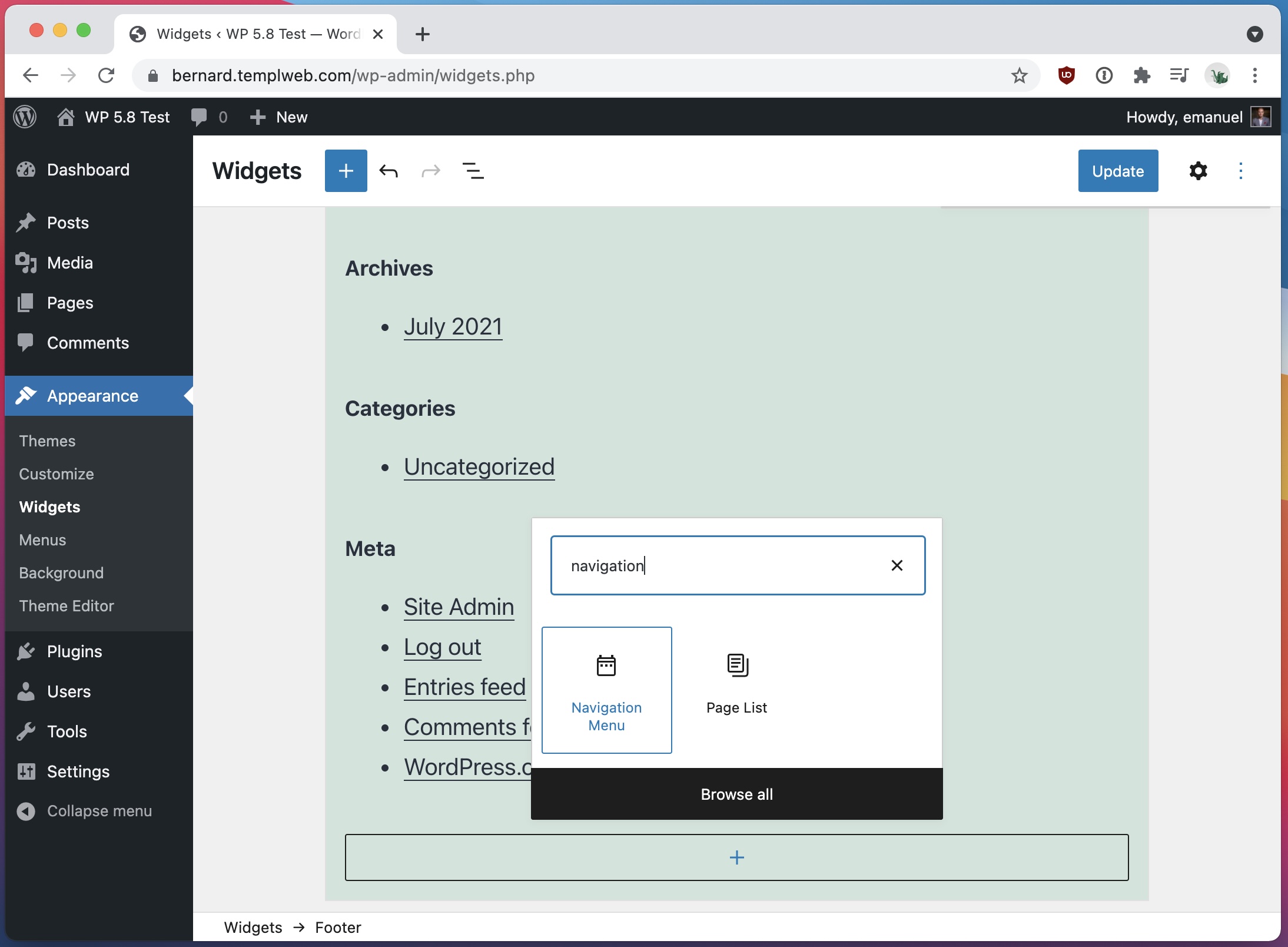
The focus for this update has been to continue moving towards “full site editing” using WP’s block editor, and new for WP 5.8 (among other things) is the block-based widget editor.

When navigating to Appearance -> Widgets, one is now introduced to the familiar block editor interface that lets one add, remove and edit current widgets.

This is certainly one step to make the user experience across WP Admin more consistent and familiar.

Block-style widget editor in WordPress 5.8
WordPress 5.8 now has a block-style editor for widget areas.

The full list of updates and new features in WordPress 5.8 looks like this:

  • Manage Widgets with Blocks
  • Display Posts with New Blocks and Patterns
  • Edit Post Templates
  • Overview of the Page Structure
  • Suggested Patterns for Blocks
  • Style and Colorize Images
  • theme.json
  • Dropping support for IE11
  • Adding support for WebP
  • Adding Additional Block Supports
  • Version 10.7 of the Gutenberg plugin

Native support for WebP images

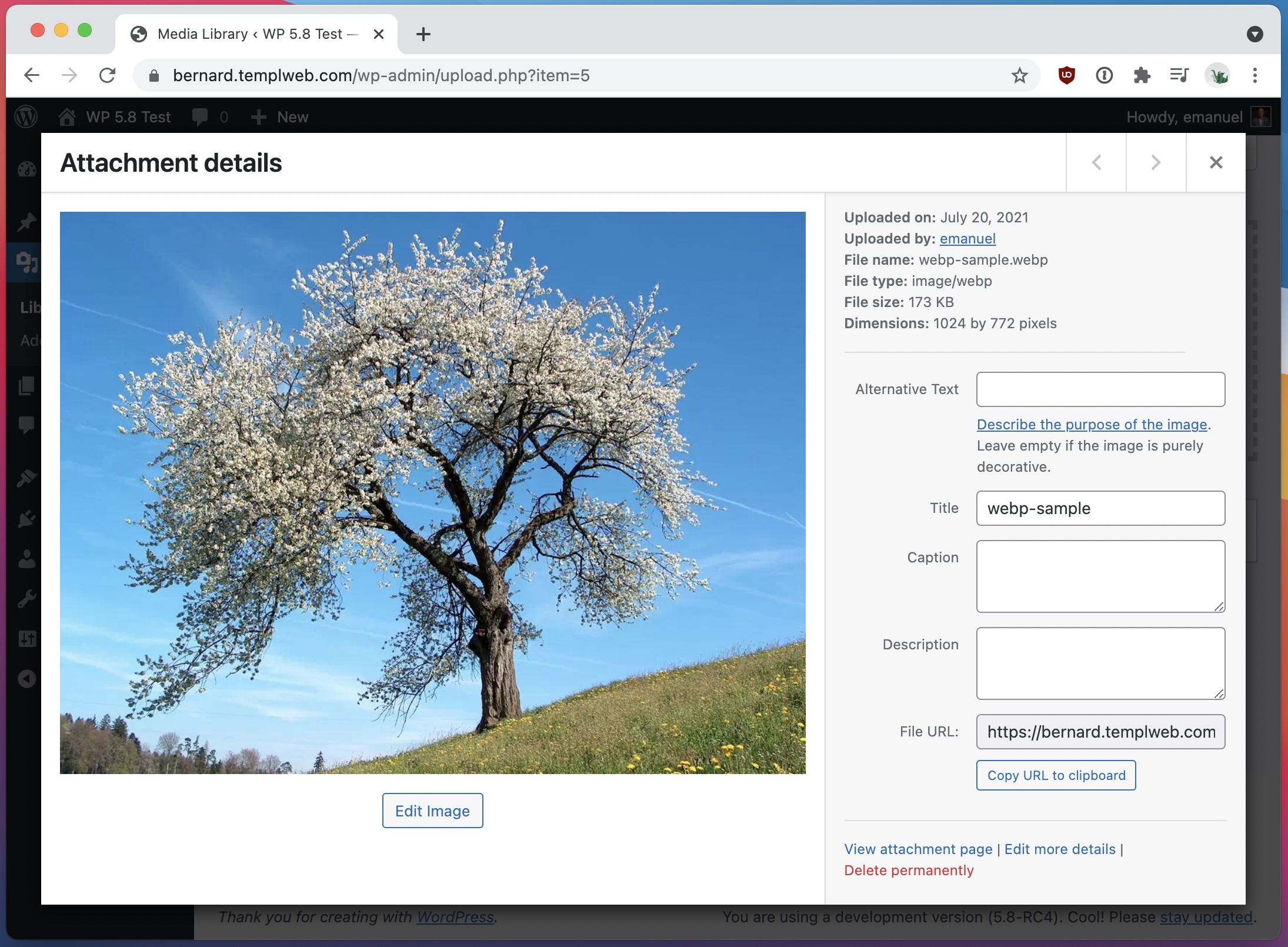
One of the biggest and most notable features in WordPress 5.8 is the added support for WebP images.

The native support for WebP images that’s introduced allows for uploading of .webp files directly in WP Admin, exactly like one would upload more traditional image files such as JPG, PNG and GIF.

WebP image in WordPress 5.8
WordPress 5.8 adds support for WebP images.

WebP offers much more efficient compression compared to JPG and PNG and can help to reduce the footprint of your website and speed up load times.

Please note however that WebP is not supported in older browser so all your visitors might not be able to see WebP images that you publish.

For a more detailed look at WebP support in WordPress, check out our ultimate guide to WebP images in WordPress.

New features for developers

For developers in general, and theme developers in particular, it’s good to know of the new support for a theme.json file, which allows for easier theming of the block editor.

An example of how to add palette colors using theme.json looks like this:

{
    "version": 1,
    "settings": {
        "color": {
            "palette": [
                {
                    "name": "Black",
                    "slug": "black",
                    "color": "#000000"
                },
                {
                    "name": "White",
                    "slug": "white",
                    "color": "#ffffff"
                }
            ]
        }
    }
}

It sure seems like this will make fully implementing the block editor in one’s theme easier than before. A much welcome addition to WordPress core.

Summary

All in all, this is a solid WordPress update that brings many improvements across the board.

At Templ we are mostly excited about the addition of WebP support however. 🙂

How do you like this new update of WordPress core? What’s your favorite feature? Let us know in the comment section below!